The AI marketing dashboard
that never needs rebuilding
Every marketing dashboard eventually hits the same wall: a new question the dashboard wasn't built to answer. Terno AI replaces the wall with a conversation, computing a real answer across every connected channel, on demand.
Why static dashboards run out of road
The same three limits show up in almost every marketing team's dashboard stack.
Built once, useful for a while
A dashboard answers the questions it was designed for. The moment the business asks something new, someone has to rebuild it.
One tool per channel
A dashboard for spend, another for pipeline, a spreadsheet for attribution. Nothing shows the whole picture in one place.
Static, not conversational
Filters and drop-downs only go as far as whoever built the dashboard anticipated. A new cut of the data means a new build.
None of these three limits are a failure of the people who build dashboards. They're structural: a dashboard is, by nature, a fixed answer to a fixed question, decided in advance. The limits only become a problem when the business changes faster than the dashboard does, which for most marketing teams is most of the time.
AI Marketing Dashboard
What replaces a marketing dashboard?
Not a better dashboard. A conversation that answers the question a dashboard was never built to show.
A dashboard is, by definition, a fixed set of views someone decided in advance were worth looking at. That's useful for daily monitoring: is spend on pace, is traffic normal, is the funnel converting at the usual rate. It stops being useful the moment leadership asks something the dashboard's builder didn't anticipate, which happens constantly, because the business changes faster than dashboards get rebuilt.
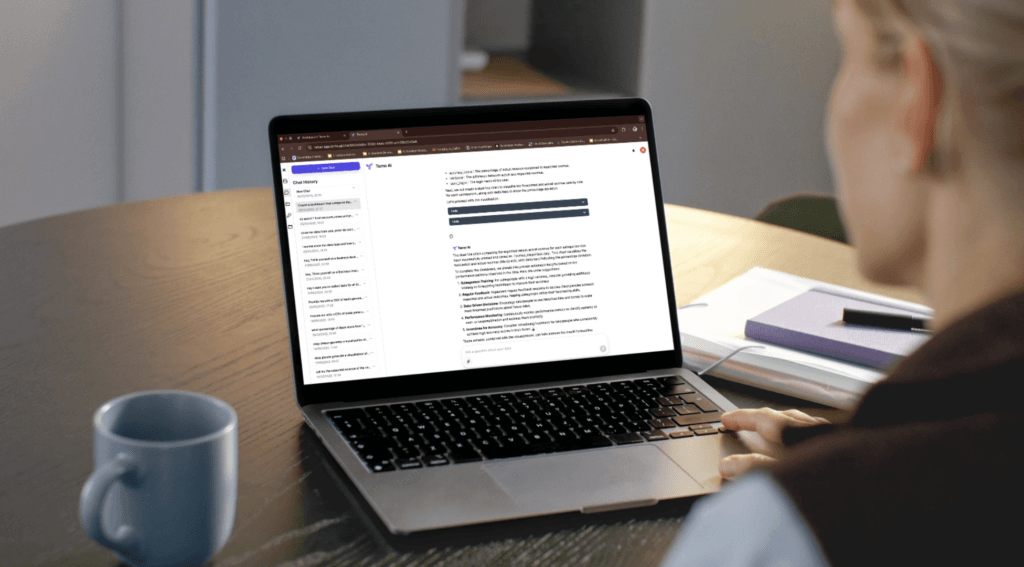
An AI marketing dashboard flips the model. Instead of navigating to the right chart, you ask the question directly, in plain English, and Terno AI computes an answer from a real query against your connected channels: Google Ads, Meta Ads, LinkedIn Ads, Search Console, GA4, and your own database. The dashboard didn't get smarter. The need for one narrowed to just day-to-day monitoring, while everything else became a question you can simply ask.
This doesn't mean every dashboard disappears. A pace-check view for daily monitoring, is spend on track, is traffic in the normal range, still earns its place, because that's exactly the repeated, unchanging question a fixed chart is good at. What disappears is the backlog of one-off requests that used to pile up behind that same dashboard, each waiting for someone to build a new view.
The bigger shift is who gets to ask. Today, a new marketing question usually gets filtered through whoever owns the BI tool license or knows enough SQL to pull it themselves, which means the person closest to the campaign is rarely the person who can answer their own question. An AI marketing dashboard removes that gatekeeping, so anyone with access can ask directly, in their own words.
These are the kinds of questions that used to sit in a backlog waiting for a dashboard rebuild, and now get answered the moment they come up. That change in speed is often more valuable than the answer itself, because it changes when a problem gets caught, not just how it eventually gets reported.
It's worth being honest about what doesn't change. An AI marketing dashboard doesn't replace judgment: someone still has to decide what to do with a computed answer, and someone still needs to own the underlying data connections and access policy. What changes is how much of the team's time goes into producing the answer versus acting on it, and for most marketing organizations, that ratio has been backwards for a long time.
What teams get when the dashboard becomes a conversation
The shift from static charts to computed answers, in practice, not just in theory.
Ask instead of build
A new question doesn't require a new chart or a new filter. Ask it in plain English and get a computed answer immediately.
Every channel, one conversation
Google Ads, Meta Ads, LinkedIn Ads, Search Console, GA4, and your own database, queried together instead of tab by tab.
Computed, not just visualized
A dashboard shows you numbers someone precomputed. Terno AI runs the actual query for your specific question, live.
No BI backlog
New reports don't wait on a data team's sprint. Anyone with access can ask a governed question directly.
Grounded in real execution
Every answer comes from a real, executed query against your governed data, not a language model's best guess.
Governed like the rest of your stack
Table, column, and row-level access control on every query, deployed inside your own cloud or on-prem environment.
Best practices for making the shift
What teams that get the most value out of an AI marketing dashboard tend to do differently.
Keep one lightweight dashboard for daily monitoring
A simple pace-check view, is spend on track, is traffic normal, still earns its keep. Reserve it for that narrow job and let questions handle everything else, instead of trying to make one dashboard do both.
Ask the question before building a new chart
The instinct to request a new dashboard view is often solvable faster by just asking the question directly. Building the habit of asking first saves the dashboard backlog for things that genuinely need to be monitored continuously.
Use cross-channel questions to catch what siloed dashboards miss
The most valuable questions usually span more than one platform, like blended CAC or which channel actually drives revenue. A single-platform dashboard structurally can't answer these; a cross-channel question can.
Treat a computed answer as a starting point for judgment, not a final verdict
Terno AI computes what the data shows. Deciding what to do about it, whether to shift budget or investigate further, still benefits from someone who understands the broader business context.
Standardize how the team asks, not just what they ask
Teams that get the most value tend to develop shared habits around asking specific, well-scoped questions, the same discipline that makes a good dashboard request effective in the first place.
Let the questions people actually ask guide what stays a dashboard
Rather than deciding in advance what deserves a permanent dashboard, watch which questions get asked repeatedly over a few weeks. Those recurring questions are the strongest candidates for a lightweight standing view.
How it works
Three steps, and no dashboard-building project in between.
Connect your channels
Authorize Terno AI with Google Ads, Meta Ads, LinkedIn Ads, Search Console, GA4, and your database. Each connection is read-only and revocable.
Ask instead of navigate
Ask a question in plain English, across any connected channel, instead of finding the right dashboard tab first.
Act on a computed answer
Get an answer grounded in a real query, not a language model's guess, so the decision that follows is based on something checked.
Terno AI vs. static dashboards vs. generic AI chatbots vs. manual analysts
Four ways to get a marketing answer. Here's how they compare.
| Capability | Terno AI | Static Dashboard | Generic AI Chatbot | Manual Analyst |
|---|---|---|---|---|
| Answers a brand-new question in plain English | ✓ | – | ✓ | ✓ |
| Answer is computed from a real query, not generated text | ✓ | ✓ | – | ✓ |
| Covers every connected channel in one conversation | ✓ | – | – | – |
| No new dashboard or report has to be built first | ✓ | – | ✓ | – |
| Marketing data never leaves your network | ✓ | ✓ | – | ✓ |
| Available the same day, every day | ✓ | – | ✓ | – |
Governed like the rest of your stack
Terno AI deploys fully inside your own cloud or on-prem environment, enforces table, column, and row-level access control on every query, and only shares controlled metadata, never raw data values, with the underlying LLM. Marketing data being easier to ask about doesn't mean it's held to a lower security bar than anything else connected to Terno AI.
Explore connected platforms
Frequently Asked Questions
What is an AI marketing dashboard? +
An AI marketing dashboard replaces a static, pre-built set of charts with a conversation: instead of navigating filters and tabs someone else configured, you ask a question in plain English and get a computed answer drawn from live data across your connected channels.
Do we need to replace our existing dashboards to use Terno AI? +
No. Terno AI works alongside your existing tools. Many teams keep a lightweight dashboard for daily monitoring and use Terno AI for the questions that come up that no dashboard was built to answer.
Which channels can an AI marketing dashboard cover? +
Terno AI connects to Google Ads, Meta Ads, LinkedIn Ads, Google Search Console, Google Analytics, and your own databases or warehouse, so a single conversation can span every channel instead of one dashboard per platform.
Is this the same as a BI tool with an AI chatbot bolted on? +
No. Most BI tools with an AI add-on still generate text based on the dashboard's existing pre-built data model. Terno AI generates and executes a new query for your specific question, so it can answer things the underlying model was never built to show.
How accurate are the answers compared to a hand-built dashboard? +
Every answer is computed from a real, executed query against your governed data, the same underlying data a dashboard would use, verified by built-in checks before it's returned, rather than generated as text.
Is our marketing data safe with an AI marketing dashboard? +
With Terno AI, yes. It deploys inside your own cloud or on-prem environment, enforces table, column, and row-level access control on every query, and only shares controlled metadata, never raw data values, with the underlying LLM.
How is this different from a generic AI chatbot? +
A generic chatbot generates text that sounds plausible. Terno AI generates and executes real code against your actual connected data, so every number is computed, not imagined.
How fast can we set up an AI marketing dashboard with Terno AI? +
Connecting each channel is a one-click, read-only authorization. Most teams are asking their first cross-channel question within the hour.
Do we still need a data or BI team if we use Terno AI? +
Yes, for the work that still requires human judgment: data modeling, pipeline maintenance, and deciding what to do with an answer. Terno AI removes the repetitive reporting requests that otherwise fill a data team's backlog.
Can Terno AI be used by non-technical team members? +
Yes. Questions are asked in plain English, with no SQL or dashboard configuration required, so access isn't limited to whoever knows how to build a report.
How does an AI marketing dashboard handle a question it can't answer? +
If a question requires data that isn't connected, such as a platform Terno AI hasn't been given access to, it will say so rather than guessing, since every answer is grounded in an actual executed query.
Can Terno AI be used for executive or board reporting? +
Yes. Because answers are computed live, a board-level question can be asked and re-asked with updated numbers at any point, rather than relying on a slide prepared in advance.
What happens to our existing BI tool if we adopt Terno AI? +
Most teams keep their existing BI tool for the small set of standing views that genuinely need continuous monitoring, and use Terno AI for the much larger set of ad hoc questions that used to require a new report each time.
Can Terno AI alert us proactively when something changes? +
Terno AI is built for on-demand questions today rather than standing alerts, so most teams ask directly when something looks off, rather than waiting for an automated notification.
How long does it take a team to change habits away from dashboards? +
Most teams keep using both in parallel at first, checking a familiar dashboard out of habit while learning to ask Terno AI directly. The shift tends to happen naturally once a few one-off questions get answered faster than a dashboard ever could.
Can Terno AI recreate a specific existing dashboard view exactly? +
Terno AI can compute the same underlying numbers a dashboard view shows, since it's querying the same connected data, but it answers as a direct response to a question rather than replicating a chart's exact visual layout.
Is an AI marketing dashboard only useful for marketing teams? +
No. Since Terno AI can connect databases and business data alongside marketing channels, the same conversational approach extends to finance, operations, and any other team asking questions of connected data.
Who typically owns the AI marketing dashboard connections and access policy? +
Usually whoever already owns dashboard and reporting tool administration today, since connecting a channel and setting access controls is a similar responsibility, just applied to a conversational interface instead of a fixed dashboard.
Can Terno AI be rolled out to one team before the rest of the company? +
Yes. Most teams start by connecting the channels one function, like marketing, relies on most, and expand to other teams and data sources once the pattern has proven useful.
Does adopting an AI marketing dashboard require a data migration? +
No. Terno AI connects read-only to the platforms and databases you already use, so there's nothing to migrate before the first question can be asked.
Get Started with Terno AI
Make faster decisions with your data. Terno AI helps teams explore databases using natural language, delivering instant insights without waiting on analysts or writing SQL.
- Self-serve analytics for teams
- No dashboards or manual queries
- Enterprise-grade security
Contact Us
Have a question, need a demo, or want to work with us? Reach out and our team will get back to you shortly.
Get in touch
We’re here to help you with data insights, onboarding, pricing or anything else.
reachus@terno.ai
Phone
+1 (412) 568-3901
Address
9450, SW Gemini Dr, PMB 90168, Beaverton, Oregon 97008-7105, United States