Personalise Terno
Tell Terno about you and your business so its suggestions and answers fit your work.
The more Terno knows about you and your business, the better its suggestions and answers.
User persona
Section titled “User persona”Open User persona from the profile menu, or click Personalise Terno on the home screen.
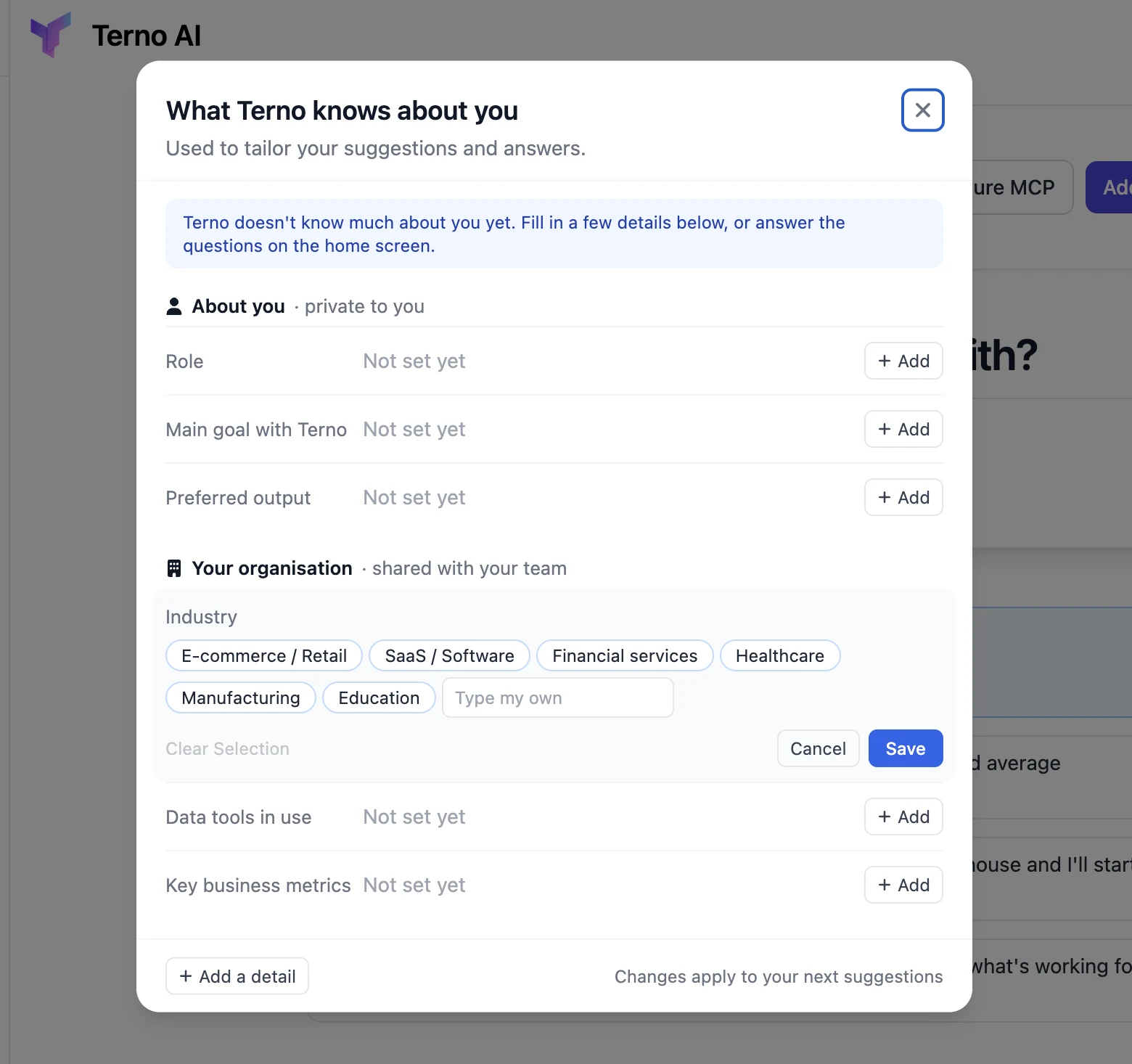
- About you (private to you): your role, main goal with Terno, and preferred output.
- Your organisation (shared with your team): industry, data tools in use, and key business metrics.
- Click + Add next to a detail to fill it in. For some, such as Industry, you can pick a ready-made option or type your own, then click Save.
- Add a detail for anything else.
Changes apply to your next suggestions. You can also answer the quick questions on the home screen, such as “What industry or type of business is your company in?”
Memory
Section titled “Memory”Memories are notes about your business, such as terms, definitions, and rules, that Terno can use when answering. Admins can view and edit them from Memory in the profile menu, which opens the Memory page of the admin panel.